Transfer ownership of a site
Plausible allows you to transfer ownership of a site to a different user or to a team you're part of.
This is useful for consultants and agencies working with clients. You set up the site, add custom events, email reports, traffic spike notifications and so on. When your job is done, you transfer ownership to your client.
Note that subscriptions are not transferred with the site. The new owner is responsible for having an active Plausible subscription. Once transferred, the site counts toward the limits of whichever account or team becomes the new owner.
Before you transfer
- Finish setup first: goals, email reports, spike notifications, funnels. The client becomes the owner and controls settings after the transfer.
- Make sure the recipient already has a Plausible account. You'll need their email address to initiate the transfer.
- Let the client know. They'll receive an email invitation and have 48 hours to accept. If they don't have an active subscription that fits the usage, they'll be guided to subscribe before the transfer completes.
- You'll keep Guest Editor access after the transfer by default. They can change your role or remove you at any time.
Transfer to a different user
- Go to site settings for the site you want to transfer
- Click Danger zone in the left sidebar
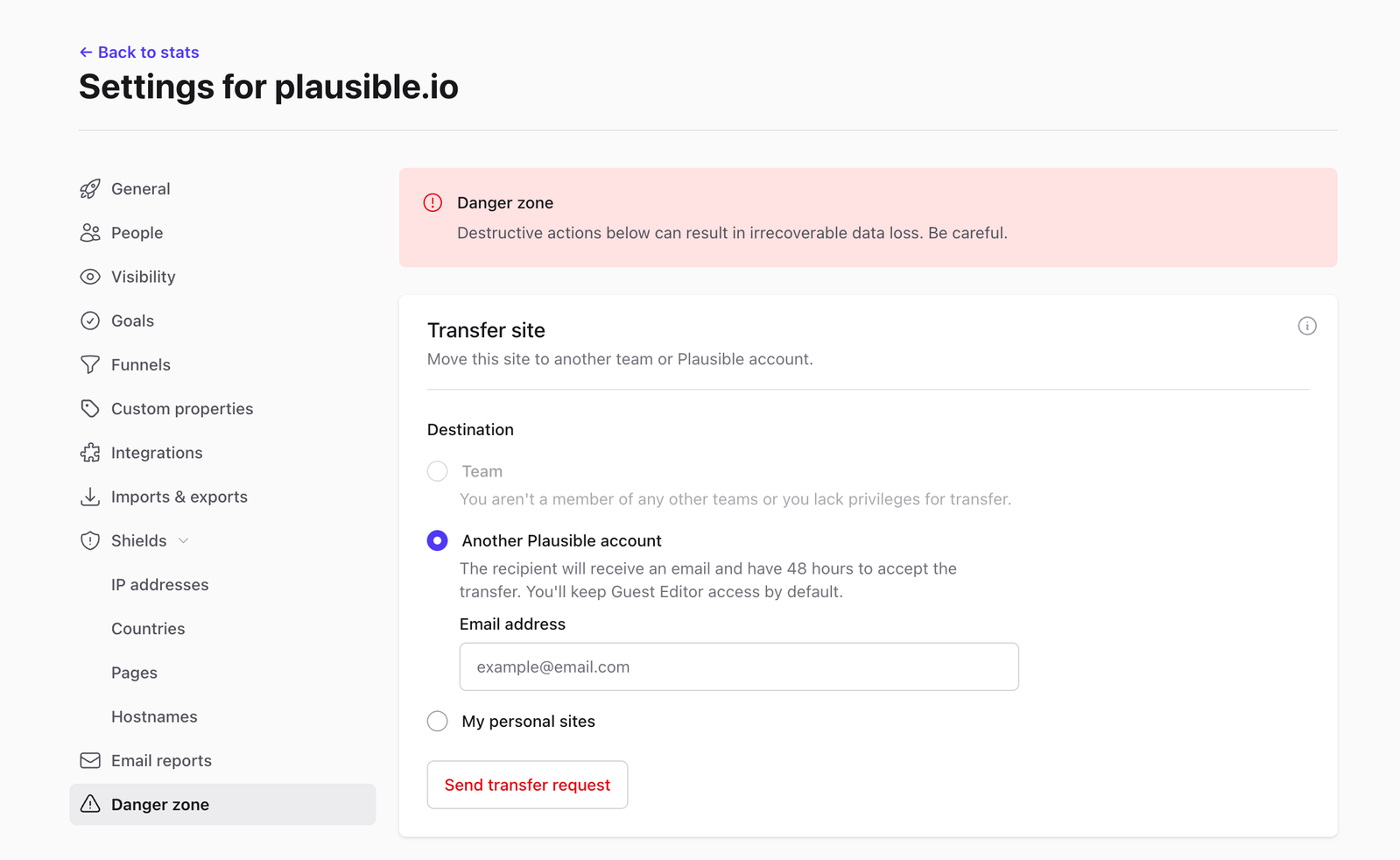
- Under Transfer site, select Another Plausible account and enter the recipient's email address
- Click Send transfer request
The recipient will get an email notification. They need to log in (or register for a Plausible account) and accept the request within 48 hours. If they don't have an active subscription, they'll need to upgrade before accepting.
After the transfer, you keep Guest Editor access to the site. The new owner can change your role or remove your access at any time.
Transfer to a team
- Go to site settings for the site you want to transfer
- Click Danger zone in the left sidebar
- Under Transfer site, select Team and choose a destination from the dropdown. Only teams you belong to are listed.
- Click Move site
The destination team must have an active subscription with a plan that supports the transfer.
Transfer a site from a team to your personal sites
If a site is currently part of a team but you want it to appear under My personal sites, you can transfer the ownership to yourself.
- Go to site settings for the site you want to move
- Click Danger zone in the left sidebar
- Under Transfer site, select My personal sites
- Click Move site
The site moves immediately to your My personal sites section. Your personal account must have an active subscription that supports the additional site.